INTERACTIVE LEARNING · PROTOTYPE

Stringing as a guided, visible sequence

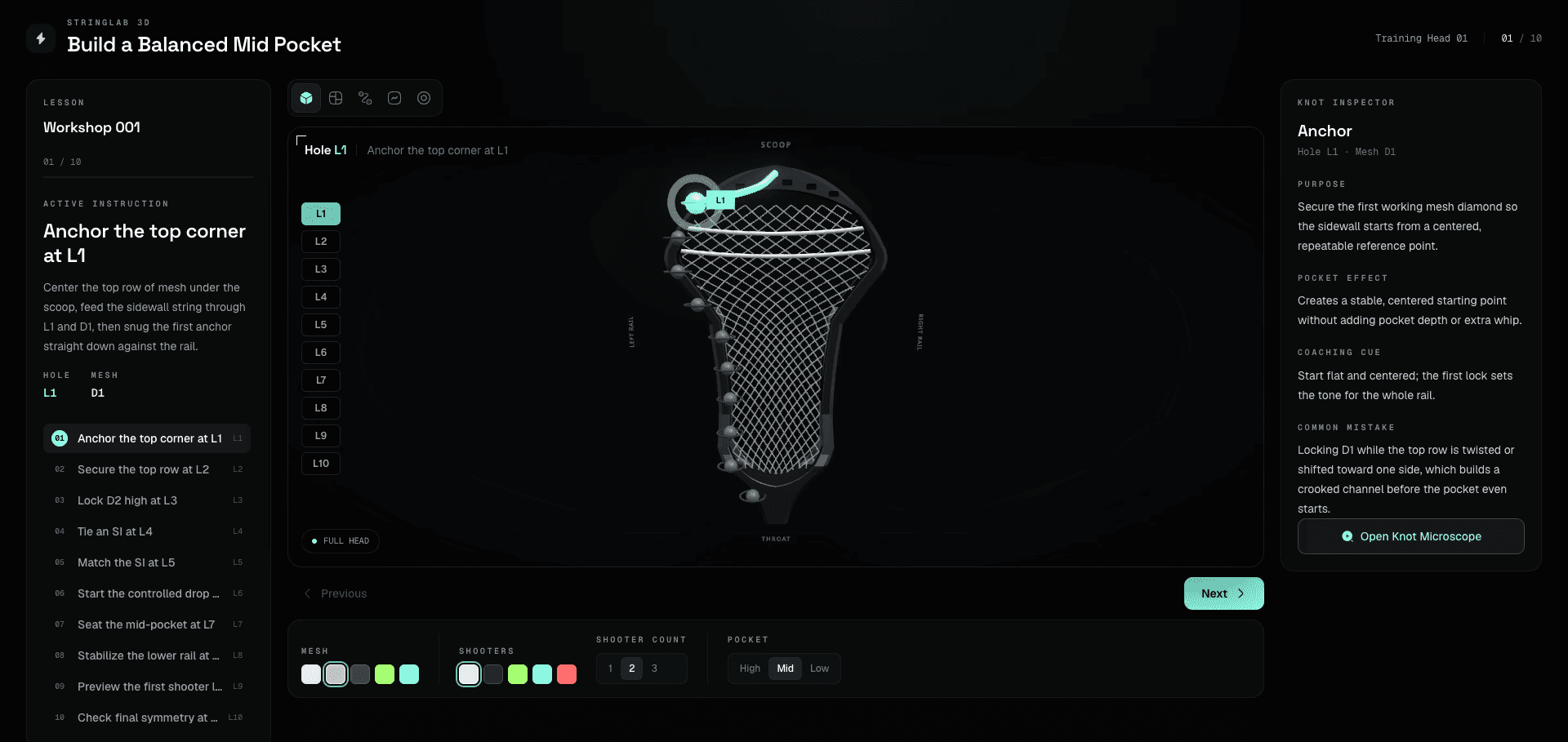
A 3D teaching workbench that turns lacrosse stringing into a guided, visible sequence—connecting the instruction, the active hole, and the knot’s effect in one frame.

Instruction, active hole, and knot effect in one frame.

WORKBENCH 001 · BALANCED MID POCKETL1 – L10
Prototype content
L1 · D1
L2 · D1
L3 · D2
L4 · D3
L5 · D4
L6 · D5
L7 · D6
L8 · D7
L9 · D8
L10 · D9
View · StandardThe head, the lesson, and the active hole in one frame.
01Standard
02Hole Map
03String Path
04Tension
05Pocket Result
Steps10
View modes5
Sections8

Teach one decision at a time.

Each step couples plain-language instruction with a directed camera, active sidewall hole, mesh diamond, and pocket effect.

Workbench 001 — Full Head

The complete head stays visible while the lesson, active hotspot, setup controls, and knot inspector remain synchronized.

STRINGLABS · PROTOTYPE

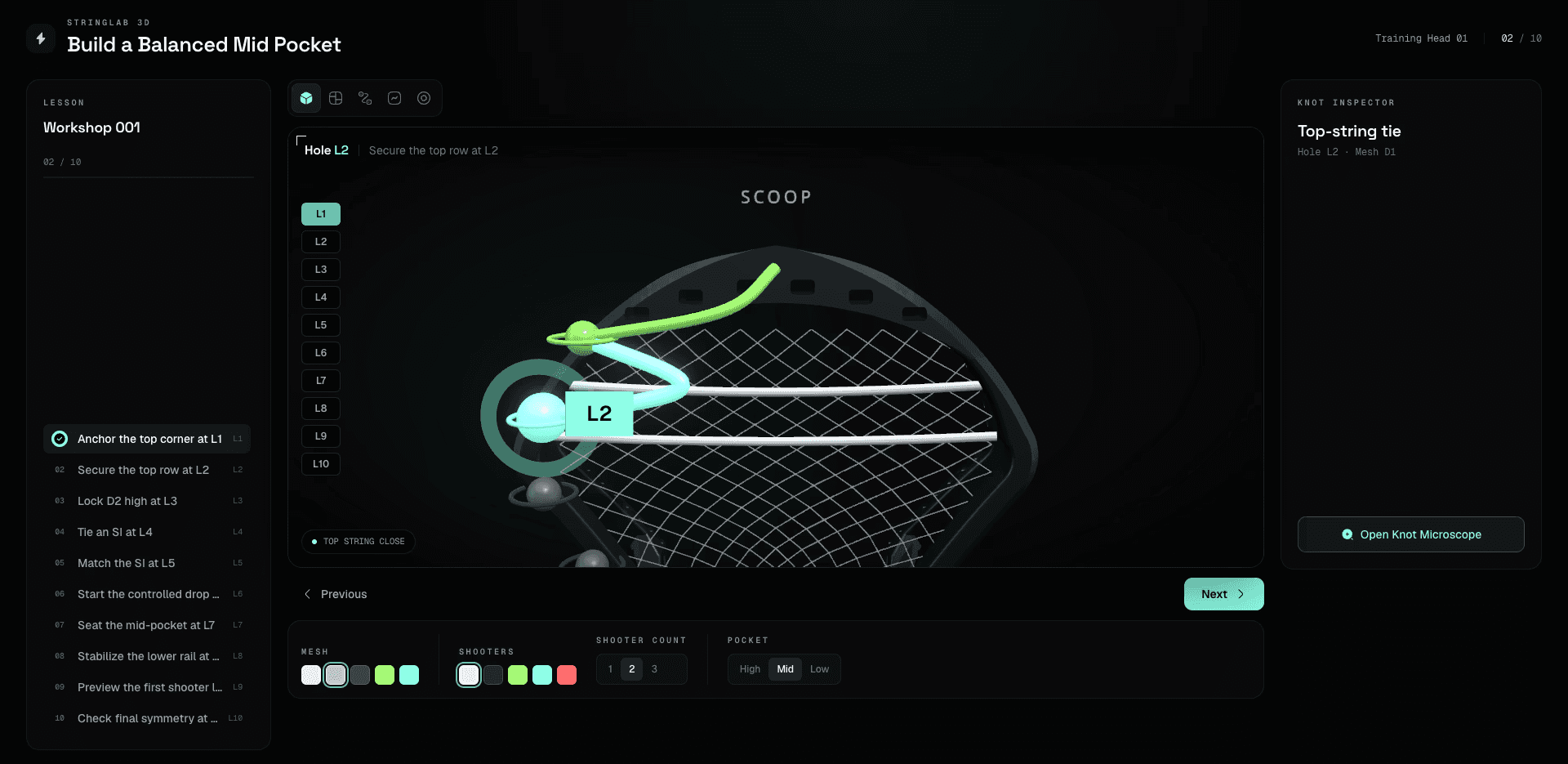
Top-String Close — L2

Advancing the lesson changes the camera, instruction, hotspot, and knot context together instead of asking the learner to translate between separate references.

WORKSHOP 001 · STEP 02

Teach one decision at a time.

Each step couples plain-language instruction with a directed camera, active sidewall hole, mesh diamond, and pocket effect.

Workbench 001 — Full Head

The complete head stays visible while the lesson, active hotspot, setup controls, and knot inspector remain synchronized.

STRINGLABS · PROTOTYPE

Top-String Close — L2

Advancing the lesson changes the camera, instruction, hotspot, and knot context together instead of asking the learner to translate between separate references.

WORKSHOP 001 · STEP 02

Ten steps, each one a decision with consequences.

The workbench teaches a balanced mid pocket across L1–L10. Every step names the hole, the mesh diamond, the knot and the tension, then states what it does to the pocket and how it goes wrong.
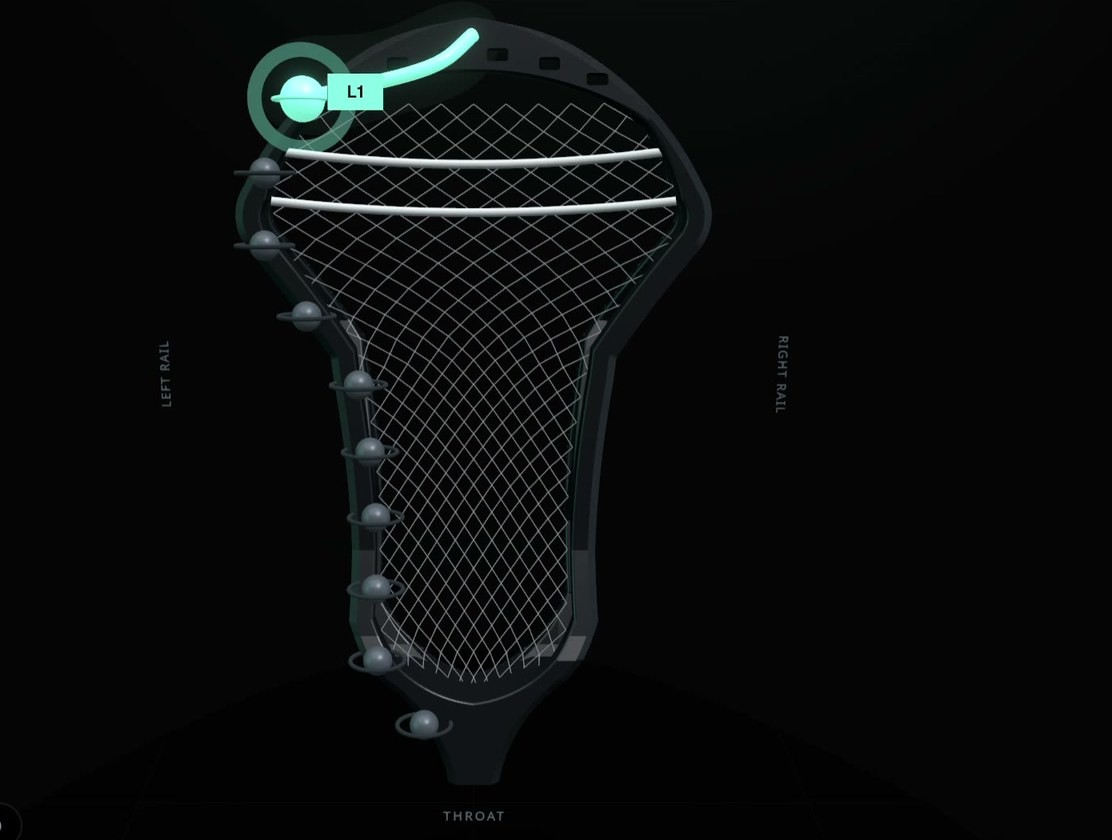
StringLabs prototype, step 01: Anchor the top corner at L1
SetupHole L1Mesh D1Medium tension
Step 01 · Anchor

Anchor the top corner at L1

Center the top row of mesh under the scoop, feed the sidewall string through L1 and D1, then snug the first anchor straight down against the rail.

Why it mattersThe first anchor gives the whole sidewall a reference point; if D1 starts centered and flat, every later pull has a cleaner target.
Pocket effectCreates a stable, centered starting point without adding pocket depth or extra whip.
Common mistakeLocking D1 while the top row is twisted or shifted toward one side, which builds a crooked channel before the pocket even starts.
Step 01 of 10: Anchor the top corner at L1.

Progress becomes part of the interface.

String Path mode separates finished, active and upcoming work, so progress is readable on the head itself instead of in a separate tracker.

String Path Mode

A dedicated view separates finished, active and upcoming work while the timeline holds your position in the build.

VIEW MODE · STRING PATH

Progress becomes part of the interface.

String Path mode separates finished, active and upcoming work, so progress is readable on the head itself instead of in a separate tracker.

String Path Mode

A dedicated view separates finished, active and upcoming work while the timeline holds your position in the build.

VIEW MODE · STRING PATH

Move from location to technique.

Five knots, each broken into three substeps with front, side and inside angles, a coaching cue and the mistake to avoid.

Top-String Tie — Knot Microscope

Instruction, pocket effect, coaching cue, and common mistake stay adjacent to the teaching visual.

MICROSCOPE V0.1 · 5 KNOTS × 3 SUBSTEPS

Move from location to technique.

Five knots, each broken into three substeps with front, side and inside angles, a coaching cue and the mistake to avoid.

Top-String Tie — Knot Microscope

Instruction, pocket effect, coaching cue, and common mistake stay adjacent to the teaching visual.

MICROSCOPE V0.1 · 5 KNOTS × 3 SUBSTEPS

The interaction system is working; the teaching recipe still needs expert validation.

The prototype proves the lesson architecture, camera direction, hotspot behavior, view states, setup controls, and knot explanation pattern. The current L1–L10 sequence is intentionally labeled as prototype content until a verified stringer authors the final recipe.

10 steps

L1–L10, each carrying instruction, rationale, pocket effect, failure mode, camera preset and tension.

5 modes

Standard, Hole Map, String Path, Tension and Pocket Result.

Open

Interaction behaviour is verified. The L1–L10 recipe is prototype teaching material, not a validated universal pattern.

The interaction system is working; the teaching recipe still needs expert validation.

The prototype proves the lesson architecture, camera direction, hotspot behavior, view states, setup controls, and knot explanation pattern. The current L1–L10 sequence is intentionally labeled as prototype content until a verified stringer authors the final recipe.

10 steps

L1–L10, each carrying instruction, rationale, pocket effect, failure mode, camera preset and tension.

5 modes

Standard, Hole Map, String Path, Tension and Pocket Result.

Open

Interaction behaviour is verified. The L1–L10 recipe is prototype teaching material, not a validated universal pattern.

0